

On this page
Complete Blender scenes
Use an existing .blend scene as a figure
panel while keeping Inklet annotations, axes and plots vector.
Start with a freely licensed anatomy model for source-derived geometry and vector labels, biological schematics for a complete synapse schematic, real organelle scenes for calibrated microscopy, or the annotated laboratory for apparatus views.
Setup
Install Blender separately (tested with 4.2 LTS and 4.5 LTS), then install the rendering extra:
python -m pip install 'inklet[render]'
inklet doctor
doctor reports the Blender executable and version, plus resvg and other
optional tools. If Blender is not discovered automatically, set
INKLET_BLENDER to its executable, or pass blender='/path/to/blender' to the
render function. Blender remains optional for ordinary plots and vector output.
The complete-scene integration is tested with Blender 4.2.23 LTS on CPU and
Blender 4.5.13 LTS on CPU and CUDA. GPU support also depends on the Blender build
and installed drivers. See GPU rendering and jobs.
Legacy vector line-art baking uses a different Grease Pencil API and requires
Blender 4.2 LTS. This restriction does not apply to render_blend(), scene
templates or the scene sketch style. See the support matrix.
Inspect before rendering
Use inspect_blend() to discover the file's authored names without rendering:
inventory = i.inspect_blend('apparatus.blend')
for scene in inventory['scenes']:
    print(scene['name'], scene['cameras'], scene['view_layers'])
    print(scene['objects'])
The JSON-compatible inventory lists object types, collections, materials, visibility flags, cameras, view layers and frame ranges, plus the source hash. It does not validate that every external texture is present; rendering performs that dependency check. Inspection does not execute embedded scripts or save the file. Its default timeout is 30 seconds.
Render an authored scene
This example requires your own apparatus.blend with a camera named Overview:
import inklet as i

result = i.render_blend('apparatus.blend', width=90, camera='Overview',
                        engine='CYCLES', samples=64, dpi=300,
                        landmarks={'electrode': 'Electrode'})
art = i.annotate(result.diagram.at('electrode'), 'Electrode',
                 side='n', clear=15, through=[result.diagram])
doc = i.document(width=110)
doc.add('apparatus', art)
doc.save('apparatus.svg', 'apparatus.pdf')
blend_scene(...) returns the Diagram directly. render_blend(...) additionally
returns metadata and cache_hit. Width/height are millimetres; omitting height
preserves the authored render aspect ratio. Specify scene= to select a named
scene and frame= for an animation frame. A named camera must belong to that
scene. Perspective and orthographic cameras are supported.
Use view_layer='Experiment' to select a view layer and preserve its collection
exclusions, holdouts and material override. Otherwise Inklet uses the active
view layer. Only the selected layer is rendered.
Authored materials, lights and colour-management settings are preserved.
transparent=True removes the world background while retaining lighting.
engine=None uses the authored engine; supported engines are CYCLES and
BLENDER_EEVEE_NEXT. Cycles uses an available GPU by default and CPU if no GPU
is available. Use device='CPU' to force CPU rendering. The seed and sample
count are explicit. EEVEE depends on a working graphics context and is not tested
on every headless environment. threads= defaults to 4; timeout= defaults to
900 seconds to allow first-use GPU kernel compilation. Cancellation can stop a
running render earlier.
A render may contain at most 40 million pixels unless max_pixels= is changed.
Quality and sketch rendering
Render quality is independent of Inklet's scientific/educational/marketing publication presets:
| Quality | DPI | Maximum Cycles samples | Adaptive noise threshold | Denoise |
|---|---|---|---|---|
draft |
100 | 16 | 0.10 | Yes |
preview |
180 | 64 | 0.03 | Yes |
final |
300 | 256 | 0.01 | Yes |
result = i.render_blend('apparatus.blend', width=90,
                        engine='CYCLES', quality='final')
custom = i.render_quality('final', samples=512)
result = i.render_blend('apparatus.blend', width=90,
                        engine='CYCLES', quality=custom, dpi=450)
Explicit dpi, samples, denoise and noise_threshold arguments override
the quality preset. Quality objects are immutable. Without a quality preset,
DPI/samples retain the previous defaults of 150/32 and denoising/adaptive
sampling retain the scene's authored settings. A zero noise threshold disables
adaptive sampling. The manifest records the effective sampling settings.
These quality presets require Cycles and work with CPU or GPU rendering.
For architectural studies and explanatory illustrations:
sketch = i.render_blend('room.blend', width=150, camera='Overview',
    engine='CYCLES', quality='final', style='sketch')
style='sketch' applies a matte surface override and dark, slightly irregular
Freestyle silhouettes, borders and crease lines. Cameras, geometry and lights
stay in place. The default style='authored' preserves authored appearance.
The preset changes materials for every object, including glass, and does not
preserve optical transparency. It requires Blender built with Freestyle.
This is a procedural sketch aesthetic, not a hand-drawn image or a construction drawing. Scene surfaces and outlines are rasterized by Blender; annotations placed with Inklet remain vector. See the showcase for the same interior in both styles and the source of its downloadable furniture asset.
Project object landmarks
Landmarks accept three forms:
landmarks = {
    'object_origin': 'Electrode',
    'local_tip': {'object': 'Electrode', 'point': [0, 0, 1.5]},
    'world_point': [1.2, -0.3, 2.0],
}
Object-local points follow the object's evaluated world transform. Projection
uses Blender's camera projection helper.
Coordinates in metadata['landmarks'] use millimetres from the image's top-left;
Diagram anchors use Inklet's centred local frame. Placement and scaling then
transform those anchors with the image.
Each landmark records depth, whether it is inside the camera frame, and a geometric occlusion result. Occlusion is a surface ray test, not an optical transmission calculation: glass can count as an occluder. Object-origin landmarks ignore a hit on their own object. Off-frame points are recorded and are not automatically labelled or moved into view. The ray test uses Blender's evaluated viewport geometry; render-only visibility flags and renderer-specific geometry can differ. Treat it as annotation guidance.
Select objects and bind data
objects=['Chamber', 'Electrode'] or collections=['Apparatus'] restricts visible
geometry while retaining scene lights and cameras. Existing hidden objects stay
hidden unless explicitly overridden. Collection names refer to Blender data
collections; selected objects still need to be present in the rendered scene.
Supported object bindings are color, location, rotation_euler, scale
and hide_render. Coordinate values are three numbers in Blender's native
units; rotations are radians. Colour overrides replace Principled BSDF base
colour inputs on copied materials, including linked texture inputs, without
changing another object's material or the saved .blend file.
For a rendered comparison, see highlighting an anatomy region.
For live data, use blend_scene_spec:
positions = i.dataset({'x': [0.0]}, name='electrode position')
location = i.derive(lambda x: [x[0], 0, 0], positions.column('x'))
panel = i.blend_scene_spec('apparatus.blend', camera='Overview',
    dpi=300, samples=64, engine='CYCLES',
    bindings={'Electrode': {'location': location}})
doc = i.document(width=100)
doc.add('apparatus', panel)
first = doc.compile()
positions.update(x=[0.5])
second = doc.compile()
The deferred panel uses its document cell dimensions. Data updates and changed scene assets invalidate affected renders. A previously compiled figure retains its original pixels and metadata. For arbitrary material node groups, simulations or geometry-node controls, author those changes in Blender; bindings deliberately support a defined property set.
Depth, normal and object-ID passes
Cycles can return numeric passes alongside the rendered image:
result = i.render_blend('apparatus.blend', width=90, camera='Overview',
    engine='CYCLES', dpi=300, samples=64,
    passes=('depth', 'normal', 'object_id'))
depth = result.passes['depth']
print(depth.value(100, 80))
ScenePass.value(x, y) reads one pixel with no additional Python dependencies.
Passes contain immutable float32 bytes, with rows starting at the top-left.
They have exactly the same pixel dimensions and physical bounds as the scene.
Data passes currently require Cycles; they are not display-colour transformed.
| Pass | Values | Background |
|---|---|---|
depth |
Axial camera Z distance in scene units | 1e10 |
normal |
Signed world-space XYZ surface normal | (0, 0, 0) |
object_id |
Integer-valued object index | 0 |
With inklet[images] installed, depth.to_numpy() returns a read-only H × W
array; normals return H × W × 3. depth.save('depth.npy') saves the numeric
array without changing precision or axes. A SceneRender retains the pass
bytes even if its original scene or cache files disappear.
Pass visualizations are ordinary image panels:
depth_panel = depth.to_diagram(value_range=(5, 20))
normal_panel = result.passes['normal'].to_diagram()
id_panel = result.passes['object_id'].to_diagram()
Depth maps near to white and far to black; use the same explicit value_range
when comparing views. Without it, Inklet derives and records each image's
foreground range. Normals map [-1, 1] to RGB. Object IDs use a repeating
eight-colour preview palette; read numeric values to distinguish every object.
Background pixels are transparent. Visualizations retain the source-data hash
and chosen range in figure manifests.
Select objects from a rendered image
stencil = result.object_mask('Electrode', 'Controller')
cutout = i.mask(result.diagram, stencil, mode='alpha', dpi=300)
The stencil uses white opaque pixels for selected objects and transparent pixels
elsewhere. It preserves the scene's bounds and registered anchors. Apply it in
the same coordinates as the original render before placing or scaling the cutout.
Request object_id before calling object_mask; unknown names raise an error.
Inklet assigns IDs in sorted object-name order and records the mapping in
result.metadata['object_ids']. Adding or renaming objects can change IDs, so
use this mapping rather than assuming an ID is stable between different scenes.
The source .blend file and its authored indices are not saved or changed.
Blender's Z and object-index passes are not antialiased. Hard masks can therefore have jagged edges and do not recover hidden geometry. Transparency follows the selected view layer's pass alpha threshold; these masks are not Cryptomatte or optical transmission masks. See Blender's render-pass reference.
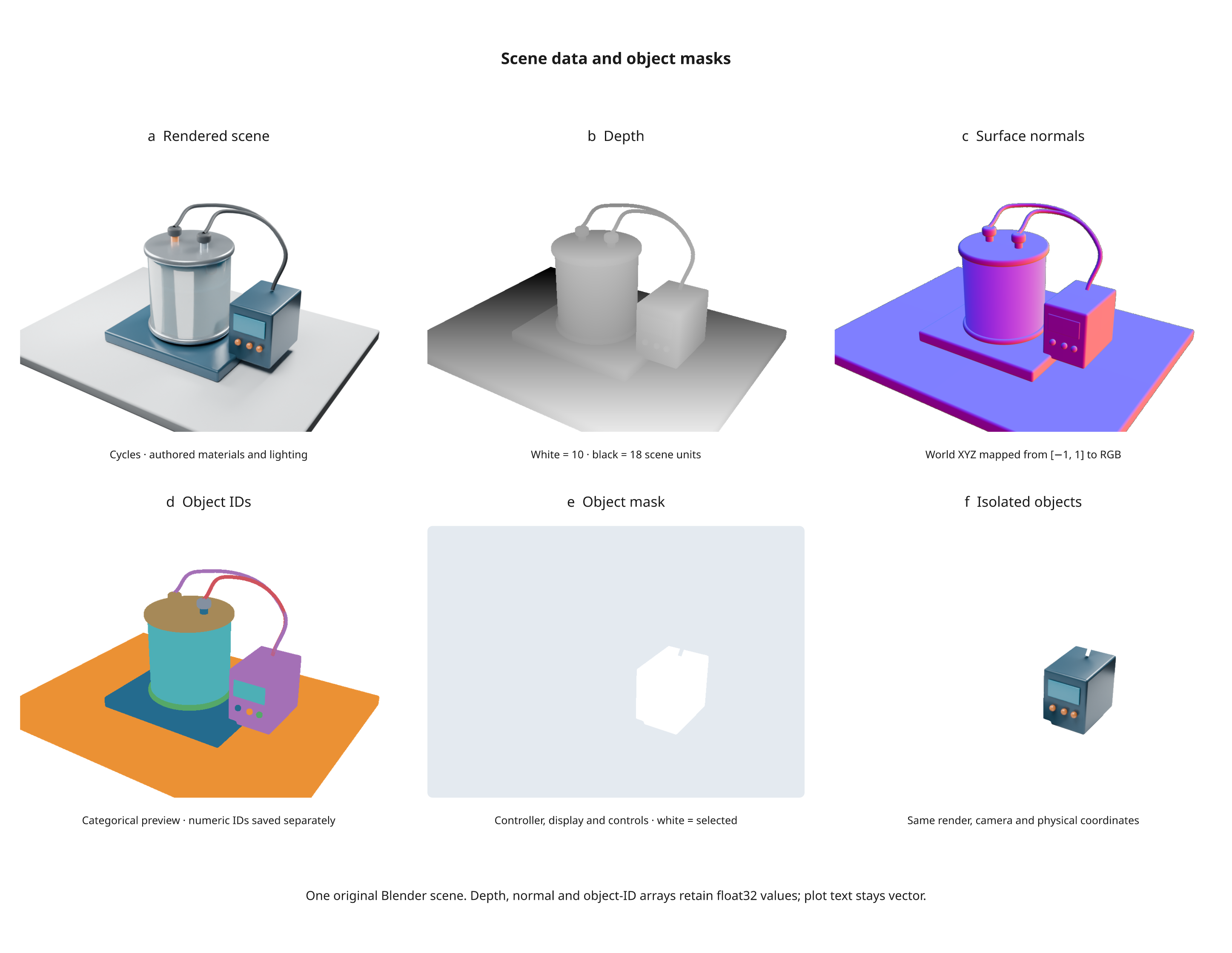
Run the six-panel example after creating the
laboratory scene with python tools/v3_showcase.py:
python examples/v3_scene_passes.py
It exports SVG/PDF/PNG, an HTML review, and all three numeric .npy arrays.
Regular figure bundles record pass hashes and properties; save .npy files
explicitly when you also need the numeric data outside Python.
Dependencies, caching and limits
The disk cache records the source scene, referenced external files, Blender
version/path, worker version, camera/frame, render settings and bindings.
The selected view layer and requested passes are part of the cache key. Every
cached pass is checked against its recorded hash; a missing or damaged pass
causes a fresh render. Passes add roughly 4 bytes per scalar pixel and 12 bytes
per normal pixel, in addition to Blender's own render memory.
Changed or missing dependencies invalidate a cached render. Changed inputs
during rendering cause a failure, and incomplete renders are not reused.
Specify assets=[...] for additional simulation caches, image-sequence frames
or dependencies that Blender's file inventory does not list. UDIM texture
patterns are expanded into existing tiles.
The manifest records dependency hashes, output-image hash, camera/frame,
colour management and landmarks. Identical input requests reuse cached pixels;
byte-identical rendering across different Blender builds or hardware is not
guaranteed. cache= changes the cache directory, or set INKLET_CACHE_DIR.
Source .blend files are never saved by the renderer. Automatic embedded Python
execution is disabled. The authored compositor and video sequencer are bypassed,
so file-output nodes cannot write to the scene's original output locations.
When passes are requested, Inklet creates a fresh compositor in the subprocess
that writes only to its temporary directory. It extracts full-precision EXR
channels there; no EXR reader is needed in the host Python environment.
Scenes requiring scripted drivers or compositor effects need adaptation. This
is a rendered scene image, not a general Blender-to-vector conversion.
Animation/video export and Cryptomatte are not included in 3.0.
After the first successful bundle, inklet watch includes scene dependencies
from its manifest. Use --watch for additional dependencies and
--build-timeout for longer scene builds. See the CLI reference.