

On this page
Linked engineering report
Experimental: the API may change.
Connect native Inklet drawings to table rows: a component selection reaches a dimensioned plan, an authored section, a system diagram and supplied response curves. Save the selected state, replace geometry, retain label offsets and export the report at two physical widths.
These are opt-in experimental APIs under inklet.experimental. inklet.experimental.engineering (BoxComponent,
BoxAssembly) is deprecated in 4.4 and will be removed in 5.0, with no
replacement; importing it warns. Pin inklet<5 for recipes that use it. This starts the mixed-content engineering work in Phase C of the
4.0 roadmap. The first numbered preview is 4.0.0.dev1.
Open the interactive report · Complete Python recipe · 170 mm version
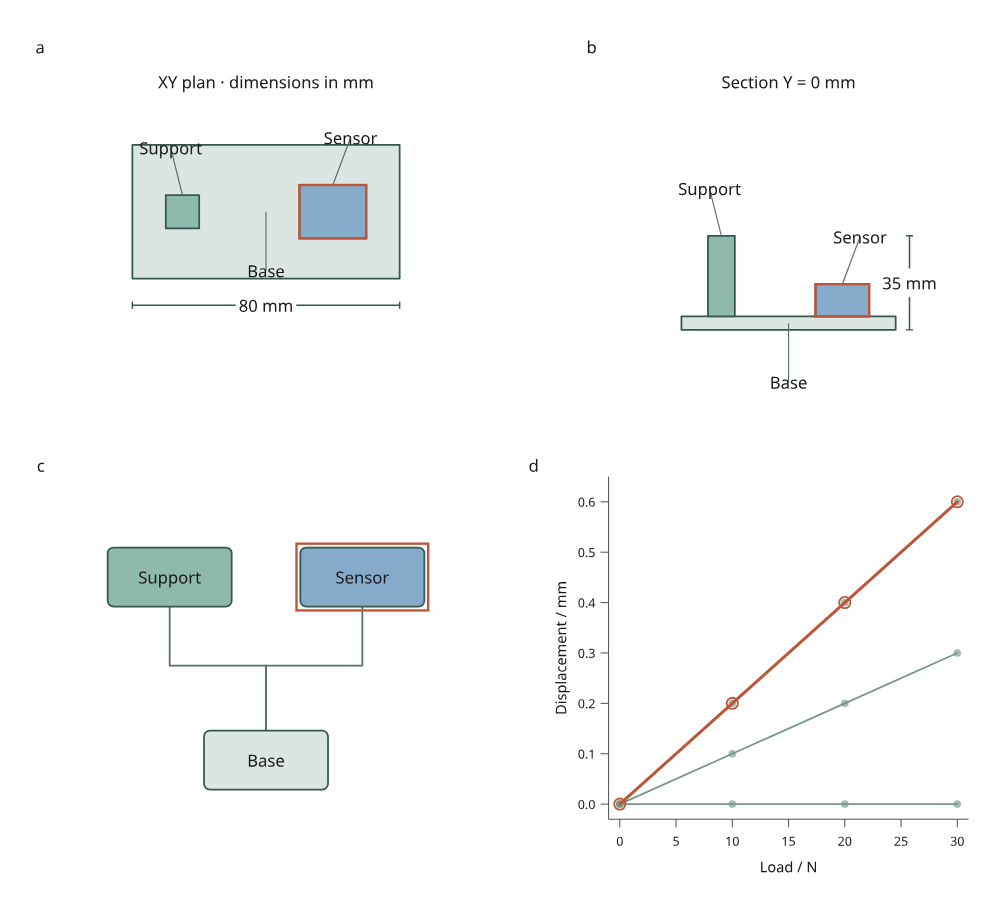
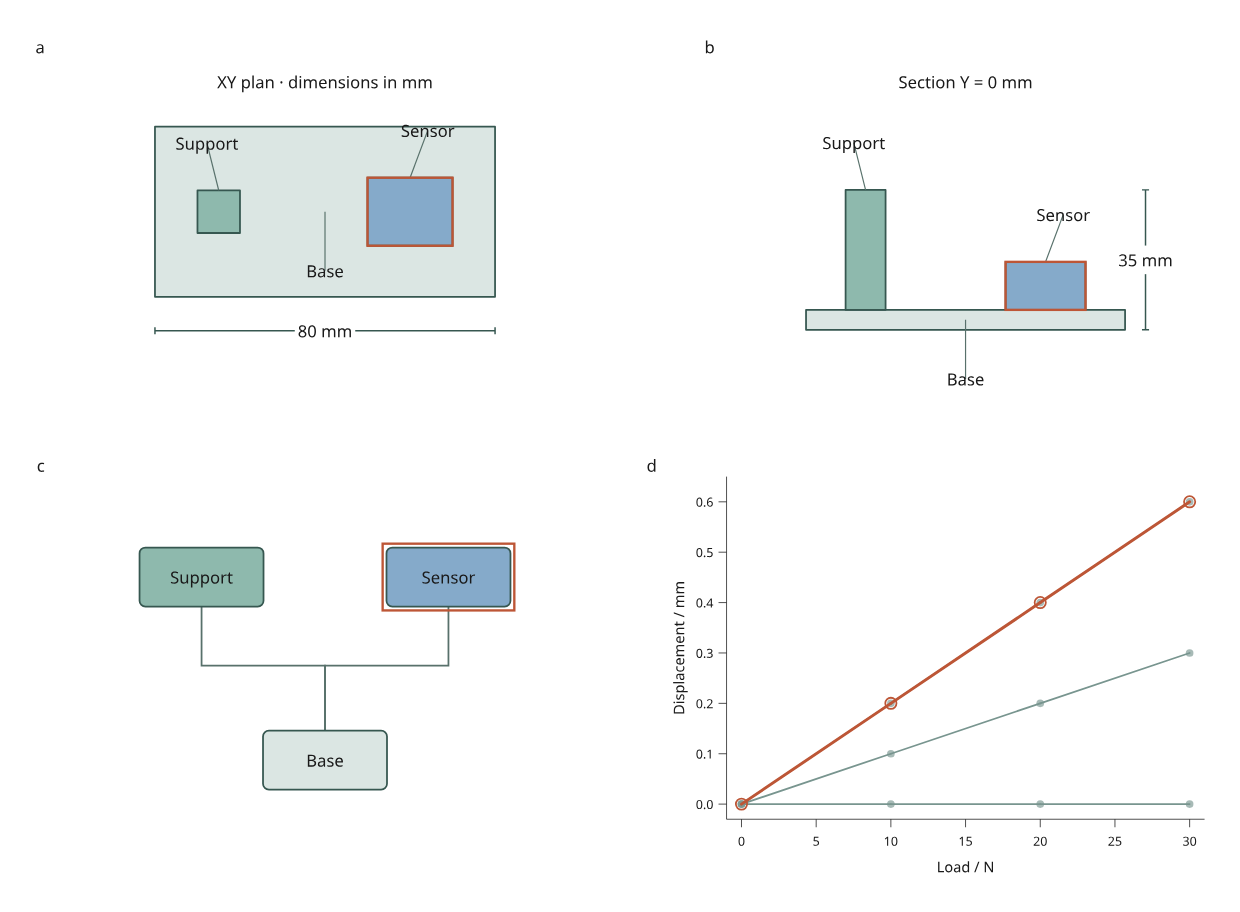
The original assembly has an 80 × 40 mm base and an overall height of 35 mm. Panel a shows its XY plan; b is a zero-thickness Y = 0 mm section; c shows authored attachment relationships; d shows supplied simulated response values. Orange outlines identify the selected sensor in every view. Geometry and response values are original MIT fixtures by Mark Marosi.
The response is illustrative, not a mechanical simulation. The base has zero displacement, the support uses half the fixture's response and the sensor uses the fixture's response. Changing geometry does not solve or update these supplied curves. Replace analysis values explicitly when a solver supplies new results. Dimensions describe the complete assembly, independently of filtering.
Run, select and revise
python examples/v4/engineering_report.py --render --output out/engineering
Select a component in any drawing, along its response curve, or through the keyboard-accessible data table. Filter by ID to hide other components; labels and connectors associated with hidden components disappear too. A connector requires both endpoints to remain visible. SVG, canvas and hybrid display use the same IDs and measured geometry.
Expand Data revision to choose:
| Revision | Geometry change | What remains explicit |
|---|---|---|
| Original | Three boxes; 35 mm total height | Supplied response and authored labels |
| Resized | Support becomes 36 mm tall; sensor widens to 26 mm and moves to X = 24 mm | Total height becomes 41 mm; curves remain supplied values |
| Removed | Support is removed from the original assembly | Its node, label and attachment disappear; removed selected/visible IDs require a drop policy |
Each alternative is compiled in Python and packaged into the offline page. Switching does not run Python, download assets or mutate the old scene. Native artwork finishes loading before a replacement becomes the active document.
Choose Save view, then reopen that JSON in the browser or reproduce it:
# A state from the original report.
python examples/v4/engineering_report.py --state /path/to/view.json --render --output out/reopened

# A state saved after switching to Resized.
python examples/v4/engineering_report.py --revision resized --state /path/to/resized-view.json --render --output out/resized

# Apply an ORIGINAL state to a different geometry revision.
python examples/v4/engineering_report.py --revision removed --rebase-state /path/to/view.json --missing drop --render --output out/removed
figure.svg reproduces the exact saved viewport. The 210 mm and 170 mm exports
recompile the full page while retaining visible and selected IDs. Label text
and stroke sizes stay authored in physical units. --render adds PNG and vector
PDF using Chrome/Chromium and Pillow. Outlined native drawing assets remain
vector content in SVG and PDF; canvas affects browser display only.
Associate native drawings with data
DrawingView calls a Python builder with the immutable table and the measured
panel width and height. Return DrawingItem objects in paint order. Coordinates
and hit boxes are panel-local millimetres, with X rightward and Y downward.
import inklet as i
from inklet.experimental.browser import BrowserFigure, DrawingItem, DrawingView
from inklet.selection import KeyedTable


def draw_sensor(table, width, height):
    sensor = i.box("Sensor", width=24, height=12).translated(width/2, height/2)
    return [DrawingItem(("sensor",), sensor,
                        description="Sensor module; supplied dimensions in table")]


table = KeyedTable("assembly", {"id": ["sensor"], "width_mm": [20]})
figure = BrowserFigure(table, [DrawingView("sensor", draw_sensor)])
The native theme and paint resolver are applied before producing self-contained outlined SVG assets. Stable drawing IDs make repeated builds reproduce the same scene digest. The browser never receives the builder callback.
Each item accepts these options:
| Field | Meaning |
|---|---|
ids |
Associated table IDs; empty means an unpickable reference |
diagram |
A native Diagram, positioned in the panel's local coordinates |
hit_box |
Optional (x, y, width, height) rectangle in panel mm; defaults to the padded layout/paint bounds |
description |
Human-readable hover description |
pickable |
Set false for labels and connectors that should not intercept pointer selection |
highlight |
Set false to suppress an extra selection rectangle around a label or connector |
All supplied IDs must exist in the table. A view may omit components, for example
when a section misses them; inspect layer["drawing"]["omitted_ids"]. With
multiple IDs, all must be visible for an item to appear; picking selects the
first associated ID. The example makes attachment connectors unpickable.
Picking uses rectangular targets, not arbitrary path silhouettes or hidden 3D surfaces. Later painted targets win ties. Selection outlines the target rectangle while retaining the artwork's authored colors. Text and strokes are not silently shrunk to fit: drawings or targets outside their panel raise a layout error. Snapshots include conservative painted bounds for strokes and halos, plus a 0.5 mm margin. Those bounds must also fit the panel.
Explicit box geometry and sections
BoxComponent(id, size, center) and BoxAssembly(components, unit) snapshot
axis-aligned boxes. unit must explicitly be "mm" or "m"; there is no
implicit unit conversion. The example imports fixtures/assembly.json through
BoxAssembly.from_dict().
from inklet.experimental.engineering import BoxAssembly, BoxComponent

assembly = BoxAssembly((
    BoxComponent("base", (80, 40, 5), (0, 0, 2.5)),
    BoxComponent("sensor", (20, 16, 12), (20, 0, 11)),
), unit="mm")

print(assembly.size)                  # (80, 40, 17)
print(assembly.section("y", 0))       # Component IDs and XZ rectangles
print(assembly.distance("base", "sensor"))  # Center distance in mm
Sizes must be positive and representable at their centers. Duplicate IDs,
nonfinite inputs and unsupported shapes fail. section(axis, position) returns
closed-box intersections with a zero-thickness plane, including a box face at
an exact boundary. Coordinates follow the remaining XYZ axes in order. Empty
sections return an empty tuple. These are geometric measurements, not contact,
volume-union or mechanical calculations.
Preserve label decisions
The recipe writes labels.json: per-component (dx, dy) offsets in panel mm.
Edit this file and pass --labels when building a report. Offsets attach to
component anchors, so geometry revisions move the anchor while preserving the
authored offset. Keep the same labels file when reopening a saved view.
python examples/v4/engineering_report.py --labels /path/to/labels.json --render --output out/labelled
assembly.json records the geometry digest, measurements and orphaned_labels
for removed components. revision.json records table and selection changes.
Invalid IDs or offsets fail; a label that no longer fits requires an authored
layout correction. This is file-based authoring, not the planned browser editor
with undo/redo or an automatic collision-resolution system.
The bounded box workflow now covers connected drawings, geometry replacement, labels, saved selection and exports. Arbitrary mesh sections, precise silhouette picking, camera interaction and general layout constraints remain future work.