

On this page
Interactive documents
Explore a figure in an offline HTML page, or use a local Python editor to revise its composition. Both workflows retain explicit saved choices, but their controls and state files serve different purposes.
These interfaces were introduced during the 4.0.0 previews. The linked
HTML documents remain opt-in experimental APIs (inklet.experimental.browser);
from 4.3 the layout editor (inklet.editor), keyed
selections (inklet.selection) and figure projects
(inklet.project) are stable. See the support and saved-file policy
before relying on experimental state formats.
Choose a workflow
| You want to… | Start here | What stays reproducible |
|---|---|---|
| Inspect, pan and zoom a native figure | Compiled-scene viewer | Native vector export and the compiled snapshot |
| Select and filter observations across plots | Linked plots | Stable row IDs and a saved selection/view state |
| Build category panels or time series | Facets, dates and time series | Category order, missing-value gaps and shared selection |
| Map points and routes alongside regions | Mixed GeoJSON features | Whole-feature identity, fixed bins and explicit source attribution |
| Join a regional map to values | Linked maps | Explicit geometry keys, bins and source attribution |
| Display distributions or supplied intervals | Linked statistics | Stated methods, reference populations and interval meaning |
| Edit linked plot appearance offline | Visual editing | Source-bound style overrides, undo/redo and Python reconstruction |
| Move named objects, revise labels or set a native camera | Local layout editor | Measured recompilation and saved composition choices |
| Reopen a study with verified assets and corresponding objects | Figure projects (introduced in dev16) | Input hashes, provenance, canonical entity IDs and editor choices |
| Replace source data | Data revisions | Explicit missing-ID policy and a revision report |
Viewers, editors and saved files
| Interface | Runs where | Save for later |
|---|---|---|
| Native compiled viewer | Standalone HTML | The Python recipe and compiled export; pan/zoom inspect the figure |
| Linked report and plot appearance inspector | Standalone HTML | Linked view.json for selection/filter/zoom, plus overrides.json for supported plot styles |
| Composition layout editor | Local browser with a running Python session | Composition layout overrides for placement, labels, supported styles and native-camera choices |
| Figure project | Python, with its existing editor | An asset bundle, entity mappings, canonical selection, editor choices and recorded exports |
The local editor recompiles your recipe when an edit changes text measurements,
layout or a native camera. Offline linked HTML applies the operations already
compiled into that page. A layout-override file and a linked style-override file
are different formats even if both are named overrides.json.
For a study with plots, diagrams and image measurements, start with the project workflow. Declare which local objects represent the same entity, verify the input files, then save and reopen the bundle through your Python reconstruction factory. The project does not save a linked page's viewport or filters; retain that page's view state separately when needed.
Run a complete report
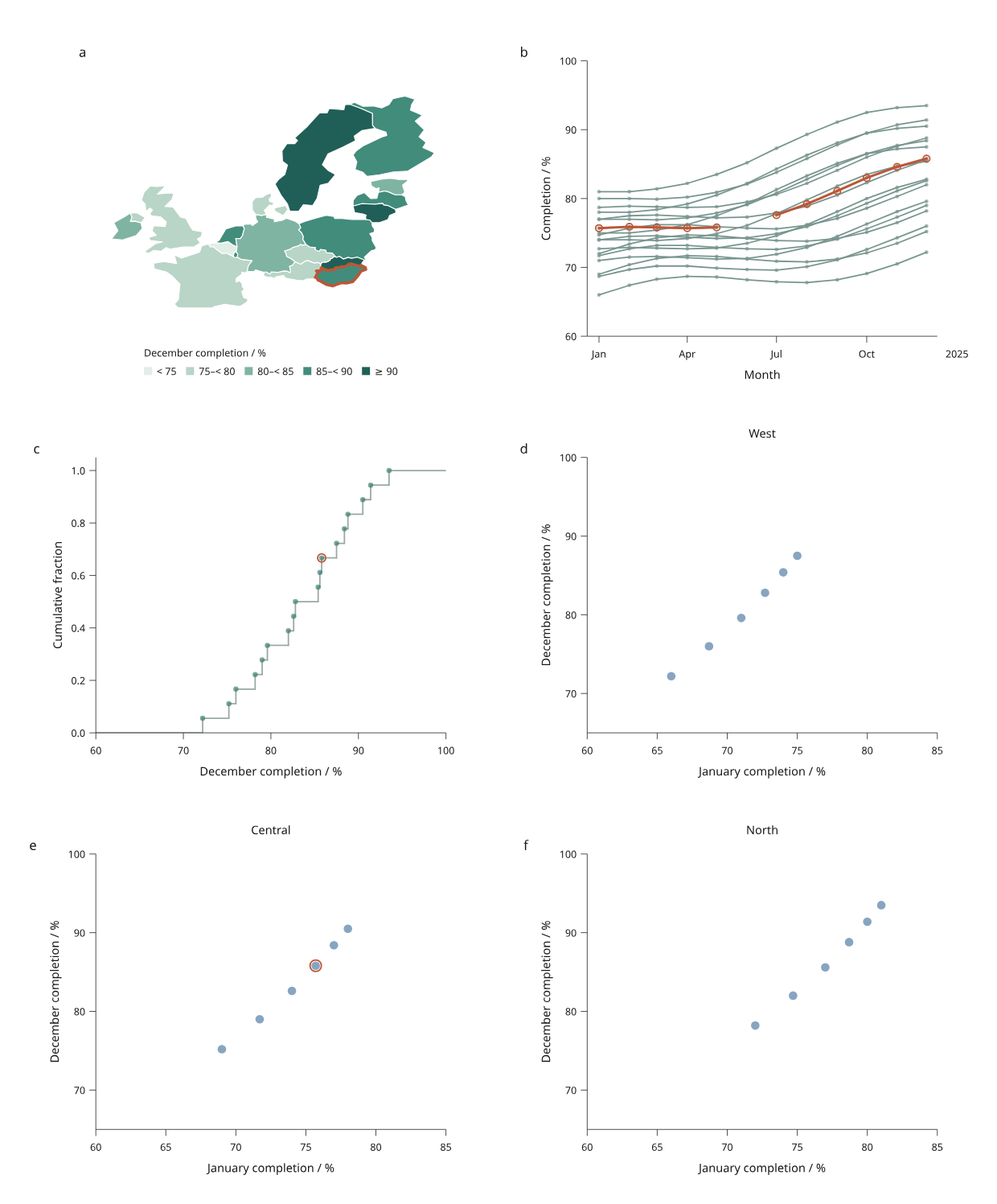
Start with the regional report: a real map with simulated measurements, linked histories, an ECDF and faceted comparisons. It exercises selection, filtering, save/reopen, source replacement and exports at two widths.
python examples/v4/regional_report.py --renderer compiled --editor --output out/regional
Open the generated index.html. Save the view for selection/filter/zoom and
save overrides for edited styles. Keep both files with the matching source
recipe and data revision. The visual editing guide shows
how to rebuild the same appearance in Python.
For other data, follow the engineering report, calibrated image measurements, mesh fields or contours and streamlines. Optional pandas and Polars adapters preserve explicit row identities.
Know the boundary
Standalone pages embed their supported operations and assets. They need no Python server or CDN to use those controls. Arbitrary Python callbacks do not run inside the exported HTML. Source replacement in the browser switches among precompiled alternatives; CSV processing and fresh compilation happen in Python.
A native compiled viewer does not automatically infer row relationships for arbitrary scene objects. Linked figures declare those correspondences explicitly. The offline linked style inspector covers named colours, marker radii and line widths. The separate local composition editor supports named labels, panel sizes and native-camera fields through Python recompilation. Individual axis label editing, camera dragging and depth-aware 3D picking remain outside those controls. Read the relevant feature guide's limits before relying on an experimental API or saved-state schema.