

On this page
GPU rendering and jobs
Available in 3.0. Cycles scene renders now default to
device='AUTO', fallback='cpu': use an available GPU, otherwise CPU.
Blender stays optional for ordinary plots and vector exports.
Discover and select devices
import inklet as i

inventory = i.render_devices()
for backend, info in inventory['backends'].items():
    print(backend, info['devices'], info['error'])
The CLI equivalent is inklet doctor --devices. Discovery lists devices
enumerated by Blender; it does not establish that a render will succeed.
Results are cached for 60 seconds. Use refresh=True after changing hardware or
drivers. blender= selects the same executable used by the scene renderer.
Automatic selection tries OptiX, CUDA, HIP, oneAPI and Metal in that order, choosing the first backend with available devices. The order is a preference, not a claim that one backend is fastest for every scene. All available GPUs on that backend are enabled unless you select exact IDs. CPU and GPU are not mixed.
These examples require your own .blend scene:
result = i.render_blend('room.blend', width=120, engine='CYCLES')
print(result.metadata['execution'])  # requested policy, actual backend, IDs, fallback reason

cpu = i.render_blend('room.blend', width=120, engine='CYCLES', device='CPU')
gpu = i.render_blend('room.blend', width=120, engine='CYCLES',
                     device='CUDA', fallback='error')
Use devices=[...] with exact IDs from the inventory to select specific GPUs.
Names and backend spellings are distinct: API backend values are OPTIX,
CUDA, HIP, ONEAPI and METAL. AUTO and CPU are also accepted.
CPU fallback applies when discovery finds no matching device or cannot probe
the driver. An explicit GPU request that falls back emits a warning; automatic
fallback is recorded in progress and metadata. fallback='error' disables it.
Render failures, out-of-memory errors and timeouts raise an error; they do not
silently retry on CPU. Blender is checked for active selected GPU devices before
rendering, preventing its own implicit CPU fallback when no GPU was activated.
The selected backend and device IDs participate in the disk-cache key. Changing between CPU and GPU does not reuse the other device's cache entry. EEVEE chooses its own graphics context; these device controls apply to Cycles.
The default render timeout is 900 seconds. Initial GPU kernel compilation can
take several minutes even for a small scene; later renders reuse Blender's
compiled kernels. timeout= sets an explicit limit. Device discovery has a
separate maximum of 30 seconds.
Observe and cancel a render
import threading

cancel = threading.Event()
def report(event):
    print(event.phase, event.message, event.fraction)

result = i.render_blend('room.blend', width=120, progress=report, cancel=cancel)
Another thread can call cancel.set(). Inklet terminates the Blender process
and raises RenderCancelled. Temporary output is removed; incomplete pixels
and passes are never committed to the cache. A previously completed cache entry
remains usable. Cancellation is cooperative around input validation and hashing,
and is polled while Blender runs and while waiting for an identical render.
RenderProgress is immutable. Phases include preparation, discovery, device
selection, kernel loading, rendering, pass extraction, cache reuse and completion.
fraction is optional and applies to the current phase, not the entire job.
Callbacks run on the calling render thread. Keep them quick; a callback exception
aborts the render and terminates its subprocess.
Queue several views
with i.RenderQueue(max_workers=2, max_gpu_jobs=1) as queue:
    overview = queue.submit('room.blend', width=90, camera='Overview', quality='final')
    detail = queue.submit('room.blend', width=90, camera='Detail', quality='final')
    print(overview.progress)
    first = overview.result()
    second = detail.result()

doc = i.document(width=190, columns=2)
doc.add('overview', first.diagram)
doc.add('detail', second.diagram)
job.cancel() cancels queued or running work. job.result(timeout=...) limits
how long the caller waits; it does not cancel the job. job.done() reports
completion. The context manager waits for all jobs; an exception inside the block
cancels outstanding work. Use queue.shutdown(cancel=True) to stop all jobs.
Limits apply per queue. max_workers bounds active worker threads, and
max_gpu_jobs bounds jobs requesting GPUs, including AUTO. The default GPU
limit is one, avoiding several Blender processes competing for the same GPU
memory. Auto jobs conservatively retain that limit even if discovery selects CPU.
threads= still controls each Blender process's CPU threads.
Submission copies the render options. Later changes to a bindings dictionary do not change a queued request. Concurrent identical calls in the same Python process wait for one render and reuse its validated cache entry. This also works across queues and direct calls. Separate Python processes still validate their own cached files, but are not scheduled or deduplicated together.
The document compiler remains synchronous. Queue expensive views explicitly, then compose their returned diagrams with vector plots and annotations. Changing one view's camera or bindings invalidates that request; unchanged views reuse their caches.
Reproduce the example
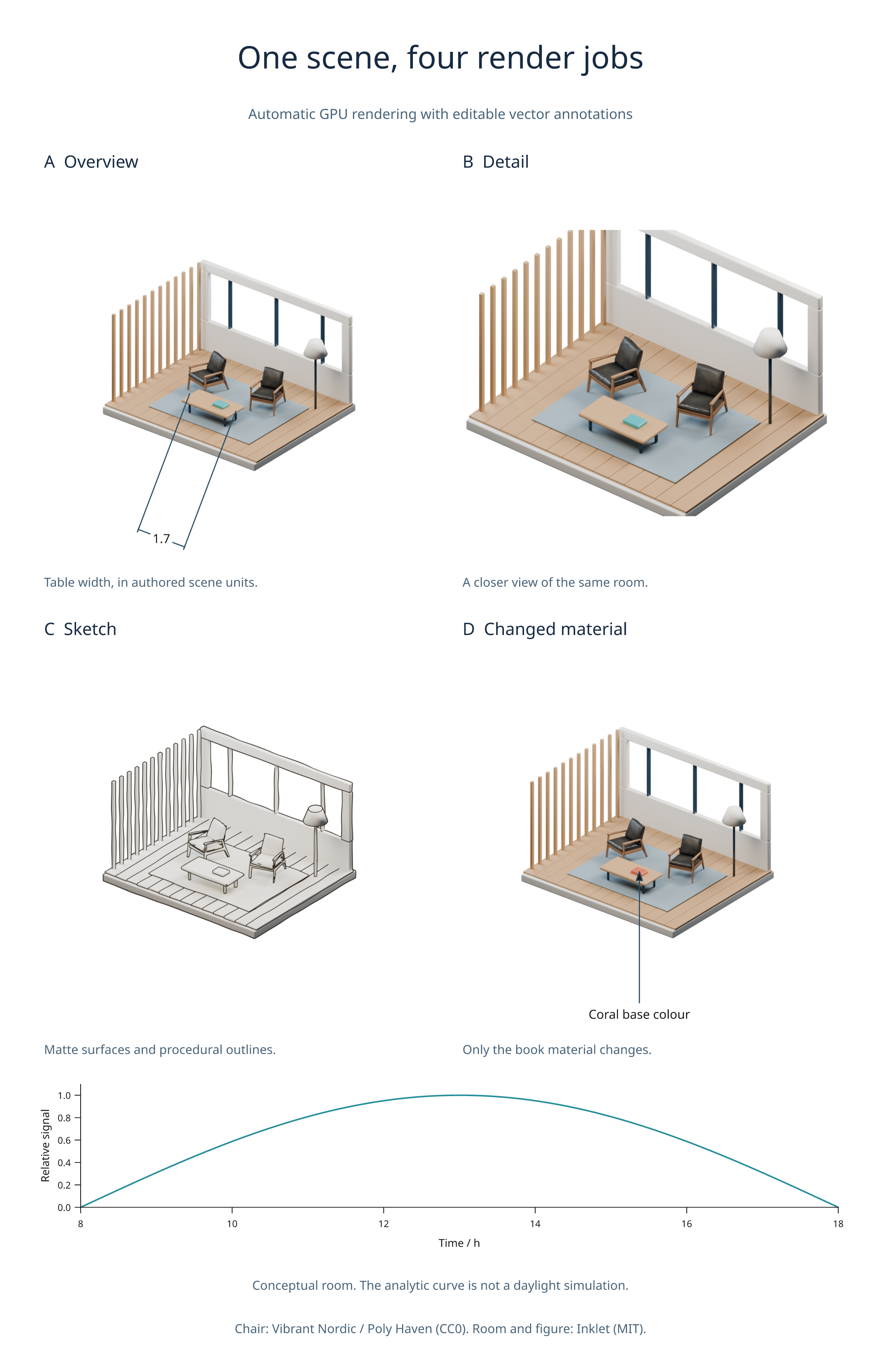
First create the architecture scene with the showcase builder:
python tools/showcase_gallery.py --only architecture --download-assets
python examples/v3_render_jobs.py --quality final
The example source queues multiple camera views,
a sketch, and one changed material binding, then exports a figure and job report.
Use --blender /path/to/blender to choose another installation.
CPU integration is tested with Blender 4.2.23 and 4.5.13 LTS. Real GPU renders, including numeric passes, are tested with CUDA on an RTX 5090 Laptop GPU. Other GPU backends share the selection API but have not been validated on real hardware here. GPU support is determined by the Blender build and drivers; see Blender's GPU rendering documentation.