

On this page
Scene annotations and measurements
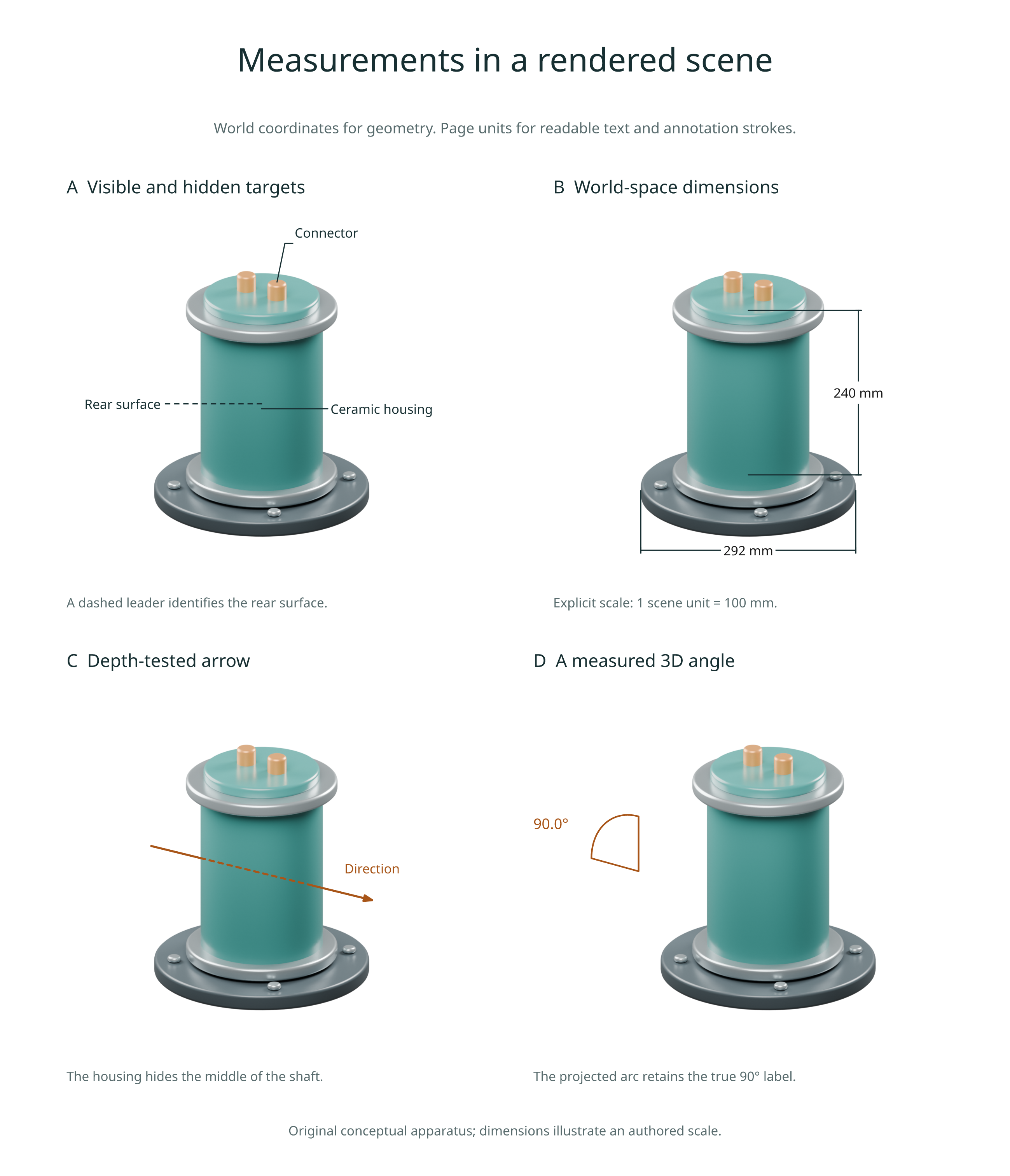
Add labels, arrows, length dimensions and angle measurements to a rendered scene. Geometry uses world coordinates; text, leader clearance, offsets and stroke widths use page units. All four helpers return vector overlay layers without copying the scene image.
For a complete biological example, follow the synapse tutorial.
Label a world point
Render your own Blender scene with a depth pass, then compose with its origin:
import inklet as i

scene = i.render_blend('apparatus.blend', width=90, camera='Overview',
    engine='CYCLES', quality='final', passes=('depth',))
label = scene.annotate3d((.5, 0, 1.2), 'Probe', side='e', clear=8,
    size=i.pt(8), hidden='dash', leader_style={'stroke_width': .25})
art = i.overlay([scene.diagram, label], align='origin')
doc = i.document(width=120, margin=6)
doc.add('apparatus', art)
doc.compile().save('annotated.svg', 'annotated.pdf')
side, clear, avoid, head, leader and text styling follow
annotate(). leader_style sets the leader's stroke options.
avoid accepts diagrams or rectangles in the same centred image coordinates;
independently created labels are not automatically aware of each other.
Pass their label bounds as rectangles when coordinating several calls.
The label targets one exact world point. With hidden='omit' (default), a
hidden target produces an empty layer retaining the scene frame. hidden='dash'
keeps the label and dashes its entire leader when the target is obscured.
hidden='show' keeps an in-frame label regardless of depth. Out-of-frame targets
are always omitted. A screen-space leader is not itself depth-tested.
Labels may extend outside the image; their extents participate in page layout
and export bounds. Every layer keeps an origin anchor, so use
align='origin' even when its bounding box is no longer centred on the image.
The scene diagram is unchanged. Intentional leader crossings of that scene
are declared to the diagnostics; unrelated crossings remain checked.
Measure a length
length = scene.dimension3d((0, 0, .4), (0, 0, 2.8),
    scale=100, unit='mm', offset=22, hidden='show', size=i.pt(8))
The label is the Euclidean 3D distance multiplied by scale, independent
of perspective or foreshortening. Here 2.4 world units become 240 mm.
Inklet does not infer metres or millimetres from Blender's unit settings:
the default is scale=1, unit='scene units'. Supply the conversion explicitly.
precision controls decimal places (default 3, trailing zeroes removed).
An explicit text string or Diagram overrides the displayed label; the measured
value remains in the export manifest.
The dimension line and witness lines are screen-space drafting geometry.
offset moves the line along the normal (-dy, dx) of the projected a-to-b
span, in millimetres. tick, witness, plate, size and stroke options
follow dimension().
Visibility tests both endpoints, not the dimension line. omit hides the
whole dimension when either endpoint is hidden; dash dashes all its lines
when either is hidden; show draws it regardless of depth. Both endpoints must
be in frame in all modes. Coincident projected endpoints raise ValueError,
including a length viewed directly along its axis.
Draw a directional arrow
direction = scene.arrow3d((-1.8, -.1, 1.5), (1.8, .1, 1.5),
    hidden='dash', head_size=1.8, stroke='#bb641f', stroke_width=.4)
The shaft uses the clipping and sampled depth tests from
path3d(). head accepts triangle, open, dot or none.
head_size is a page length, independent of perspective, and shrinks for very
short projected arrows. The head is drawn only at the original tip: clipped
arrows do not acquire a new head at the image edge.
Hidden tips have no head in omit and dash modes. show draws the head at an
in-frame tip without a depth test. Head visibility samples the tip, not the
whole triangle or dot; a head can overlap a nearby silhouette. Shafts that
project to a single point have no head.
Measure an angle
angle = scene.angle3d((1, 0, 1), (0, 0, 1), (0, 0, 2),
    radius=.6, hidden='show', side='e', clear=3, size=i.pt(8),
    stroke='#bb641f', stroke_width=.3)
Arguments are a, vertex, b. Inklet measures the minor angle between the
two world-space arms and labels it in degrees (default precision 1).
The arc lies in their 3D plane before projection; the apparent angle on the
page can differ from its true value. radius uses world units and defaults
to 30% of the shorter arm. Zero-length or collinear arms are rejected.
The arc uses 64 straight segments plus two radial lines. These are depth-tested
as a single path; step_px and max_samples control visibility sampling, not
arc tessellation. The label sits beside the projected arc midpoint and follows
that point's visibility. side and clear place it in page coordinates.
Use an explicit text to replace its displayed value.
Reproduce the example
python examples/v3_scene_annotations.py --quality final
The script creates an original sensor scene and exports PNG, SVG, PDF, an HTML
review and annotations.json to out/v3-annotations. It uses automatic GPU
selection with CPU fallback. To reuse the dev4 scene, pass
--scene out/v3-paths/sensor.blend. --blender /path/to/blender selects an
installation. The dimensions illustrate an explicit authored scale; this is
a conceptual apparatus, not a manufacturing drawing.
Figure source · Scene source · Figure gallery
Saved snapshots and precision
After rendering, these helpers need neither Blender nor NumPy. They use the
saved camera and depth pixels, with the same resolution, transparency and
silhouette limits as vector paths.
depth_bias is in world units. All helpers require a depth pass except in
show mode. A point on a perspective camera plane has no finite projection.
Export manifests include rendering.scene_annotations: world coordinates,
measured values, visibility controls, source cache key and final placement.
Path-based annotations also record their sampling under scene_overlays.
Custom label text does not change the measured value. This metadata does not
automatically convert units or validate the physical meaning of a model.